Rental Income Report: Rent Ledger and Rent Roll in One Place
Two reports answer almost every money question a landlord gets asked. A rent ledger is the official record of financial transactions between a tenant and the landlord or property manager, line by line. A rent roll is an itemized report of rent payments across every unit — who is in it, what rent they owe, and what is past due. Both documents are essential for effective property management, and Equipped builds them from the rent you already collect.
- A complete payment history per tenant, with outstanding balances
- A rent roll across every rental property, unit, and lease
- Exports for tax season, a lender, or a real estate valuation


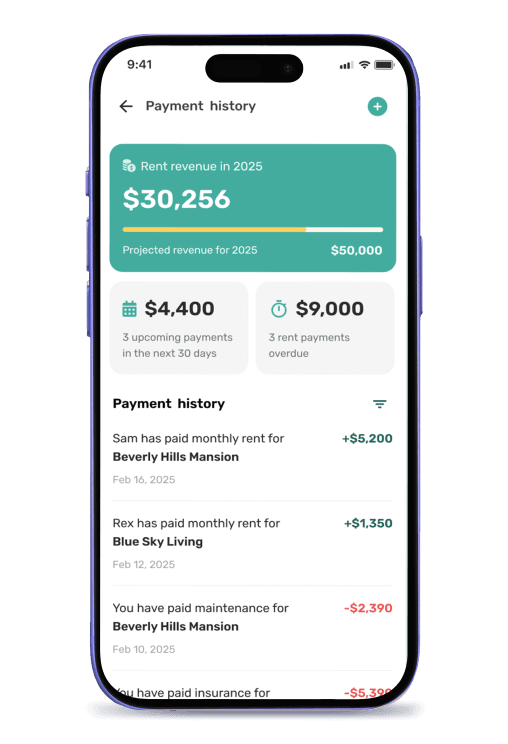
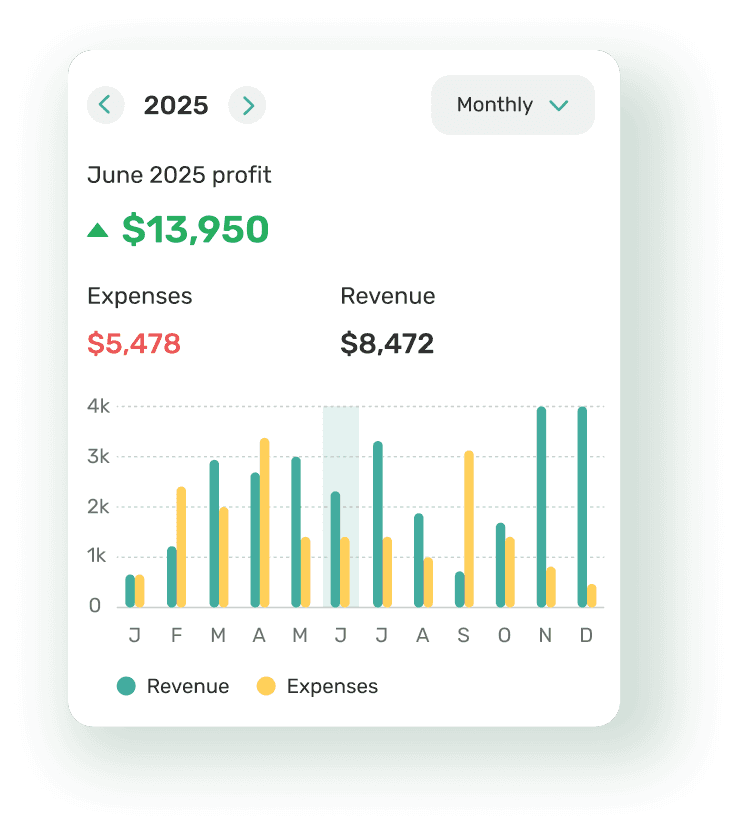
What a Rent Ledger and a Rent Roll Actually Show
A rent ledger includes tenant details, transaction dates, charge descriptions, debits, credits, and a running balance after each entry. Detailed entries cover standard rent, late fees, utility charges, additional rent such as parking, and the security deposit. Best practice is to separate standard rent from other charges so outstanding balances stay clear — and to include late fees only where the lease agreement and applicable law authorise them.
A rent roll is the portfolio view: one row per unit showing tenant names and lease details, unit number, square footage, the lease start and expiration date, the monthly rent amount, deposit held, and any rent owed. Rent rolls aggregate financial data across all units and help landlords track rental income and occupancy status, which is why a buyer or lender reads one as the primary snapshot of rental income before valuing the real estate.
Kept by hand, both drift. Maintaining a rent ledger properly means recording entries immediately and reconciling with bank statements regularly — regular reconciliation against actual bank deposits is what catches errors early. Automated rent ledgers reduce manual data entry errors, and using digital property management software enhances the efficiency of keeping track. Because Equipped collects the rent and holds the lease terms, the rental income report is live data rather than a document somebody maintains.
What Belongs on a Rent Roll
A rent roll is only useful if it is complete. These are the fields that make the report answer questions instead of raising them:
- Tenant and unit — tenant names, unit number, property type, and square footage where you track it
- Lease dates — lease start and expiration date, so a lease renewal is visible months ahead and you can begin marketing on time
- Money — monthly rent amount, annual rent, security deposit held, and any additional rent under the lease agreement
- Status — rent collected this period, past due rent, and outstanding balances per tenant
- Additional notes — concessions, planned rent increases, or anything transaction related that explains a number
With those fields present, monthly and annual rent totals are arithmetic rather than an afternoon of work, and you can adjust rents at renewal from evidence instead of instinct.
Benefits of a Live Rental Income Report
You Always Know What Rent Is Owed
Every rent payment posts to the ledger as it clears, so tracking a rent ledger helps you identify missed or late payments quickly and calculate late fees correctly. That is the difference between chasing a tenant in week one and discovering the gap in month three.
Lease Dates Stop Ambushing You
Because the rent roll carries the lease start and end date for every unit, expirations surface early. You have time to discuss a lease renewal, plan rent increases, or begin marketing the unit instead of learning about a move-out with three weeks' notice.
Property Performance You Can Compare
Landlords use rent rolls to evaluate property performance and cash flow. Rent amounts, income, and expenses sit per unit and per rental property, so you can see which property generates the return you expected, identify areas to fix, and make informed decisions about what to keep.
Proof Both Sides Can Rely On
A rent ledger serves as proof of payment for landlords and tenants alike — a shared, auditable payment history. Tenants use it to verify their rental-payment history when applying for future housing or a loan, and because accurate records can affect whether they are approved, getting the entries right matters to them as much as to you.
Spreadsheet Rent Roll vs. Equipped
Landlords can create a rent ledger using spreadsheets or templates, and many do. The difference is whether the numbers come from the rent you actually collected or from somebody remembering to type them in.
| What matters | Spreadsheet | Equipped |
|---|---|---|
| Source of the numbers | Typed in after the fact | The rent payments themselves |
| How current it is | As of the last update | Live |
| Data entry errors | Manual, so frequent | Nothing to mistype |
| Lease dates | Maintained by hand | From the lease agreement |
| Past due rent | Whatever you remember | Calculated per tenant |
| Tax reporting | Re-categorised in January | Schedule E-ready export |
Who Needs a Rent Roll Most
Any landlord benefits from keeping track properly. For these owners the report is doing real work.
You Are Refinancing or Selling
A lender or buyer asks for a rent roll and the supporting rent ledger before valuing the real estate. Clean, exportable financial statements shorten that conversation considerably.
You Own More Than One Unit
Past one unit, monthly rent payments across properties stop fitting in your head. A single report showing every lease, tenant, and balance keeps a small rental business off memory.
Your Tenants Renew on Different Dates
Staggered lease terms are good for cash flow and terrible to track manually. Sorting current tenants by expiration date turns renewals into a plan.
You Have Ever Argued About What Was Paid
A tenant's rent payment history, dated and complete, ends most disputes in a minute — and a rent ledger acts as documented evidence in legal and eviction proceedings if it does not.
A Note on Reports and Advice
A rent roll and a rent ledger are records, not tax or legal advice. What a landlord must retain, what a court accepts as proof of rent owed, and which late fees may lawfully appear on a ledger vary by state — and tax returns should be prepared with an accountant. Equipped produces the documentation; how you use it is between you and your advisers.
What To Expect: Building Your Rental Income Report in Equipped
Add Each Rental Property and Unit
Enter the unit number, property type, and square footage once so the rent roll has its key information.
Enter the Lease
Lease start, expiration date, monthly rent, security deposit, and any additional rent. These lease terms drive every figure in the report.
Collect Rent Through the App
Each rent payment posts to the tenant's ledger immediately, so nothing is entered twice and nothing is reconciled by hand.
Watch the Balances
Late fees, partial payments, and past due rent update per tenant as they happen, and the rent roll reflects them at once.
Export When Asked
Pull the rent roll or a complete payment history for a lender, an accountant, or tax season, in a format they will accept.
Why Choose Equipped for Rent Roll and Ledger Reporting
Most landlords keep rent roll data in a spreadsheet because their rent collection tool does not produce one. That split is the whole problem: two records of the same money, and the one you show people is the one nobody verified. Equipped collects the rent, holds the lease agreement, and generates both reports from them — so the rental income report is not a document you maintain, it is a view of what happened.
For property owners and property managers that means effective property management with less bookkeeping: monitor income across the portfolio, spot a tenant sliding into arrears in the first week, and hand a lender clean financial statements without a weekend of work. Rent rolls support accurate tax reporting and financial planning, and keeping track stops being a task and starts being a by-product of collecting rent.
About Equipped
The rental income report is part of financial reports, and it is populated by automated rent collection. Equipped is a rental property management software company headquartered in Alpharetta, Georgia. The Equipped app is a mobile rental property assistant for iOS and Android that centralizes tenant screening, onboarding, rent collection, maintenance, and property records in one place. Landlords across the United States use Equipped to track rent payments and stay organized. Download the Equipped app to get started.
Frequently Asked Questions
Stop maintaining the spreadsheet
Download the Equipped app on the Apple App Store or Google Play.