Rental Property Accounting Software That Shows Income, Expenses, and Profit Per Property
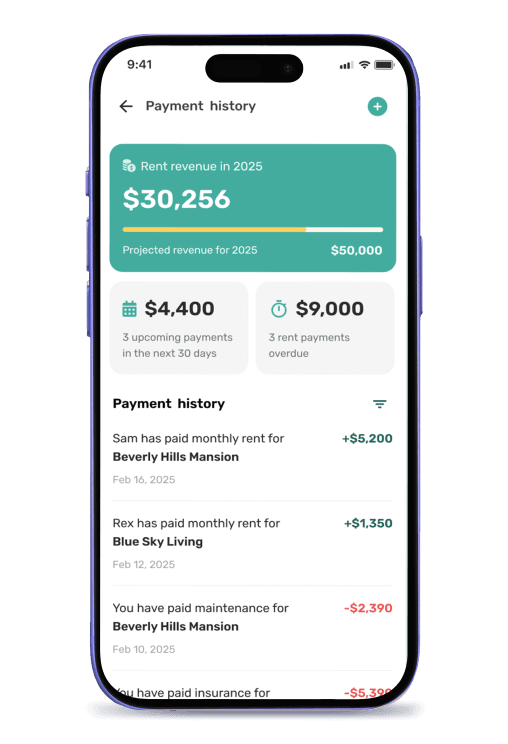
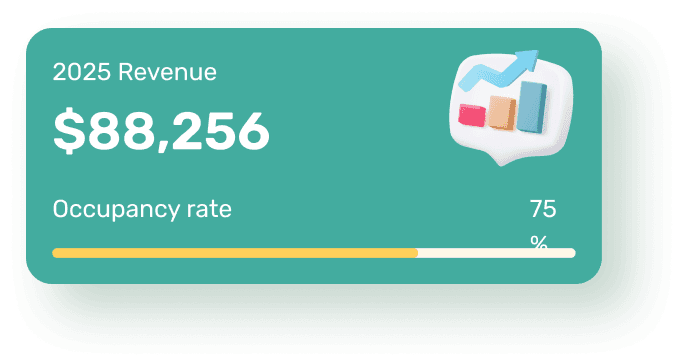
Equipped turns the rent you collect and the maintenance you pay into clear financial reports — income, expenses, cash flow, and profit per property — without spreadsheets or manual data entry. Because rent collection and work orders already live in the app, the numbers flow into your reports on their own.
- Income and expenses tracked per property, automatically
- Cash flow and profit per unit, ready any time
- Tax-ready breakdowns that map to Schedule E


How Rental Property Accounting Software Works
Rental property accounting software records every dollar tied to a property — rent collected, deposits, fees, and maintenance costs — and organizes them into income and expense categories. Instead of a shoebox of receipts or a spreadsheet you update by hand, each transaction is attached to the property and unit it belongs to.
The value is in the categorization. Rent payments, late fees, and contractor invoices each land in the right bucket, so a profit-and-loss view and cash-flow summary build themselves. For taxes, that categorization maps to the income and expense lines landlords report on IRS Schedule E.
Inside Equipped, the reports are a byproduct of the work you already do. Rent collected through the app counts as income the moment it clears. A contractor invoice you pay on a work order counts as an expense against that property. You don't import anything — you read the report.
Benefits of Rental Property Accounting Software
No More Manual Data Entry
Because rent collection and maintenance run inside Equipped, income and expenses post to the right property automatically. There's no exporting CSVs from one tool and importing them into another, and no month-end reconciliation marathon.
Per-Property and Portfolio Views
See profit per unit and a snapshot across your whole portfolio in the same place. A property that looks profitable on rent alone may not be once maintenance is in the picture — Equipped shows you both.
Tax Season Without the Scramble
Categorized income and expense reports line up with what landlords report on Schedule E. Come tax time, you hand your accountant a clean breakdown instead of a year of bank statements.
Decisions Backed by Real Numbers
Knowing cash flow and profit per property tells you which units to keep, where costs are creeping, and whether a rent increase is overdue. Reports turn guesswork into a decision you can defend.
Rental Property Accounting Software vs. Spreadsheets & General Accounting
Both can track money. The difference is whether your rental income and expenses arrive on their own or you key them in — and whether the numbers carry property context.
| Workflow Stage | Spreadsheets / General Accounting | Equipped |
|---|---|---|
| Income entry | Manual entry or bank import | Posts automatically from rent collection |
| Expense entry | Save receipts, categorize by hand | Posts from work order invoices |
| Per-property tracking | Custom tabs or "classes" to set up | Built in by property and unit |
| Cash flow & profit | Build the formulas yourself | Ready dashboard |
| Tax prep | Re-categorize at year end | Schedule E-ready breakdowns |
| Tenant & rent context | Lives in a separate system | Same app as screening & rent |
Who Needs Rental Property Accounting Software
Once you own more than a unit or two, tracking the money in your head or a spreadsheet stops scaling. Here's when dedicated reporting earns its place.
You Own More Than One or Two Units
With several properties, blended bank deposits hide which unit is actually making money. Per-property reporting separates the winners from the ones quietly losing cash.
You're Tired of Spreadsheet Bookkeeping
If month-end means updating tabs and chasing receipts, automated reports give you that time back and remove the data-entry errors that creep into manual sheets.
Tax Season Is a Yearly Fire Drill
If you reconstruct the year from bank statements every spring, categorized reports mapped to Schedule E turn that scramble into a simple export.
You Manage With Partners or Staff
When more than one person touches the money, one shared set of reports keeps everyone working from the same numbers instead of separate spreadsheets.
When You Might Not Need It Yet
If you own a single unit you rent to family and handle taxes in an afternoon, a spreadsheet may still be enough. The case for dedicated reporting grows with each property and each expense you would otherwise forget.
What To Expect: Reporting in Equipped
Add Your Properties
Add each property and unit once. Every payment and expense you record afterward attaches to the right one.
Collect Rent and Pay Expenses In App
Rent collected and contractor invoices paid through Equipped post to income and expenses on their own.
Open Your Reports
View rent collected, maintenance costs, cash flow, and profit per unit — plus a portfolio snapshot across everything you own.
Export for Taxes
Hand your accountant a categorized, Schedule E-ready breakdown instead of a year of statements.
Why Choose Equipped for Rental Property Accounting
Most rental accounting tools start from a blank ledger and ask you to feed them. Equipped starts from the work you already do — collecting rent and handling maintenance — so the reports are accurate without a separate bookkeeping habit. Income, expenses, and profit live in the same app as your tenants and rent.
General accounting software like spreadsheets or QuickBooks can do the math, but they don't know which tenant paid or which unit a repair belongs to. Equipped does, because screening, rent collection, maintenance, and reporting are one connected workflow. That context is what turns raw numbers into decisions.
About Equipped
Financial reports include a rental income report with a rent ledger per tenant and a rent roll across every unit. Equipped Global LLC is a SaaS company headquartered in Alpharetta, Georgia, and the maker of the Equipped rental property app for iOS and Android. The Equipped app helps landlords and property managers run tenant onboarding, rent collection, work orders, and maintenance in one connected workflow. Billing runs monthly or annually via ACH or card through Stripe. Download the Equipped app on the Apple App Store or Google Play.
Frequently Asked Questions
See your rental finances clearly today
Download the Equipped app on the Apple App Store or Google Play.