Direct Deposits for Rent Collection: Automatic Rent Payments on a Schedule
The most reliable rent payment is the one nobody has to remember. With automatic rent payments the tenant authorises the transfer once, and rent is automatically withdrawn on the same date every month — no login, no reminder, no transfer to chase. Units on autopay achieve roughly a 99% on-time rent rate, and tenants using it were late only about 1% of the time. Equipped sets recurring rent payments against the lease, posts each one to the right unit, and applies late fees on its own when money does not clear.
- Tenants enroll once; rent is pulled on schedule every cycle
- ACH transfers, plus debit card and credit card for tenants who prefer them
- Every payment posts to the tenant record and the rental property


How Automatic Rent Payments Work
Auto pay works on an authorisation, not a promise. Tenants link a bank account or card to the payment portal and authorise a set monthly withdrawal, which eliminates the manual action every cycle. Enrolment usually goes out as an email invitation and takes a few minutes to complete. From then on the payment processor initiates the transfer on the schedule you set, moves money from the tenant's bank account to the landlord's account, and reports back to the app. You are not asking anyone to pay rent.
Two directions exist and the difference matters. Bill pay at the tenant's bank uses push payments — the tenant instructs their bank to transfer funds, and only they can change or cancel it. Direct deposit rent through online rent collection software pulls instead: the tenant authorises the debit, the platform initiates it, and you can see whether it succeeded. Pull beats push for collecting rent because the schedule belongs to the lease rather than to whoever set it up.
Settlement depends on the rail. An ACH payment moves over the same network as payroll direct deposit and can take three to five business days to fully post, so the withdrawal should start ahead of the date you need the money. A credit card or debit card clears faster and costs more. If there are not sufficient funds the transfer fails, the app flags the payment status, and automatic late fees apply per the lease — the same way, for every tenant.
Setting the Payment Schedule So Rent Lands Before Your Bills
The point of automated rent collection is not just convenience, it is timing. Rent that arrives on the 5th when your mortgage clears on the 3rd still causes a cash flow problem, so the payment schedule should work backwards from your obligations rather than forwards from habit.
Three settings decide when money actually lands:
- The due date. Set it in the lease and in the app together. Most landlords use the 1st, but a mid-month date can be smarter when your mortgage falls late in the month.
- The initiation date. Because ACH transfers take three to five business days, the debit has to begin before the day you want the funds. Equipped handles that offset for you.
- The grace period. The window between rent falling due and the moment late fees apply. Keep it short and identical for everyone.
Tenants paid on a bi-weekly cycle sometimes struggle with one monthly debit. Splitting rent into two automated payments, where your lease allows it, turns a missed payment into two smaller ones that clear — and partial payments still post against the balance rather than vanishing into a transaction feed.
What Automatic Payments Do Not Fix
Automation removes forgetting, not shortage. A tenant without sufficient funds produces a failed transfer, an insufficient funds charge from their own bank, and a balance still owed. That is why payment notifications matter: digital receipts and notifications go to both tenants and landlords, so the app surfaces payment issues the same day rather than at month end and a conversation happens while a payment plan is still realistic. Pairing auto pay with automated reminders covers the tenants who never enrolled.
The second thing it does not fix is enrolment. Tenants have to complete setup, and a tenant who never links a checking account is not on auto pay whatever the lease says. Make enrolment part of onboarding rather than an optional step afterwards, and confirm every unit in the first cycle. Landlords who accept rent payments by several methods see higher enrolment than those who insist on one — flexibility is what makes tenants make rent payments the easy way.
Benefits of Recurring Rent Payments
Rent Arrives Without Being Asked For
Some 41% of property managers name late rent payments as a major issue, and on time payments should not depend on memory or on your willingness to send an awkward text. The debit runs, the money moves, and the first thing you hear about rent is that it cleared. Autopay is reported to cut administrative work for property managers by around 50%, which across several units is hours of administrative tasks and real administrative costs removed from every month.
Predictable Cash Flow
When rent lands on the same date each month you can schedule your mortgage, insurance, and maintenance against it. Recurring payments minimise late fees and improve cash flow stability, so late payments become the exception you investigate rather than the normal state you plan around, and rental payments start behaving like a business line rather than a surprise. Steady cash flow is the whole argument for online rent collection.
Enforcement Without a Confrontation
Automated systems remove the awkwardness of collecting late payments. Automatic late fees apply from the lease the moment the grace period ends, consistently for every tenant, so you are not deciding case by case whether a charge is worth the conversation — the rule you wrote is the rule that runs, which is what makes it defensible later.
Records That Build Themselves
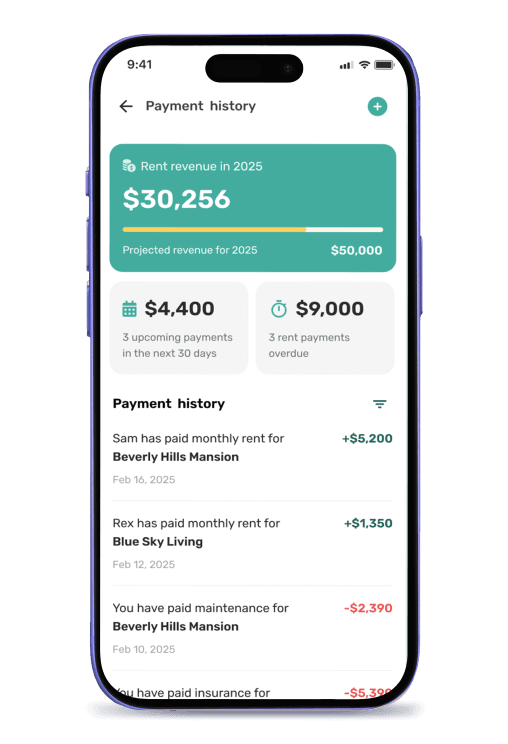
Payment history and receipts are tracked electronically in the portal, so every transfer, failed debit, partial payment, and security deposit logs against the tenant and the unit as it happens and you stay organized without maintaining anything. Manual methods increase the risk of error and fraud; at tax season the history exports instead of being reconstructed, and a lender or accountant gets a real ledger rather than bank statements you annotate from memory.
Bank Bill Pay vs. Automatic Rent Payments in Equipped
Both move rent without anyone writing a check. The difference is who controls the schedule, what happens when a payment fails, and whether the transfer leaves a record tied to the lease.
| What matters | Tenant's bank bill pay | Equipped |
|---|---|---|
| Who controls the schedule | The tenant, silently | The lease |
| Direction | Push payments | Authorised pull on the due date |
| Payment options | One bank account | ACH, debit card, credit card |
| Failed transfer | You notice eventually | Flagged the same day |
| Late fees | Applied by hand, or skipped | Automatic per the lease |
| Multiple units | Matched by hand each month | Posted per property automatically |
| Record | Bank statement lines | Per-tenant ledger with balances |
Who Needs Automatic Rent Payments Most
Every landlord collecting rent benefits from automation. In the situations below the manual version has already cost real money.
Your Mortgage Runs on the Same Cycle
When rent funds a mortgage, a payment that arrives a week late is your problem. A fixed debit date with a settlement buffer protects cash flow far better than a reminder does.
You Manage Several Rental Properties
Reconciling monthly rent payments across units by hand is where errors and missed payments hide. Automatic deposits and per-property posting replace the checklist you rebuild every month.
You Have the Same Late Payer Every Month
Auto pay moves that tenant from "pays when reminded" to "pays on schedule," and it prevents costly late fees for them too — which is why automated payments reduce tenant turnover by easing payment friction.
You Manage Rentals Alongside a Job
Property managers and part-time rental owners both run out of hours before they run out of tasks. Automation is what lets one person handle rent collection for a small portfolio without a bookkeeper — the same reason property management software exists.
A Note on Authorisation and Fees
Recurring debits need the tenant's written authorisation, and some states limit whether a landlord can require a single payment method or pass a small fee for card processing to the tenant. Settlement times, ACH fees, and transaction costs are set by the payment processor and can change — confirm current details in the app and check your local rules before writing a policy into the lease. Any payment software you choose should have a clearly outlined security policy.
What To Expect: Setting Up Direct Deposit Rent in Equipped
Add the Property and Rent Terms
Enter the monthly rent, the due date, the grace period, and the late fee rule once per unit.
Connect Your Payout Account
Link the account that receives rent. Payouts route through the payment processor, so your bank account details stay out of the tenant's hands.
Invite the Tenant to Enroll
An email invitation takes them through linking a checking account or card and authorising recurring rent payments for the lease term.
Rent Is Automatically Withdrawn
The debit initiates ahead of time so funds land when you need them, and a receipt issues to both sides.
Failures and Fees Handle Themselves
A failed transfer is flagged the same day, late fees apply once the grace period ends, and the balance updates.
Everything Posts to the Record
Rent, partial payments, security deposits, and fees log per tenant and per unit, ready to export at tax season.
Why Choose Equipped for Automated Rent Collection
A bank transfer moves money and stops there. It does not know the lease, the due date, or which unit the payment belongs to, so reconciliation, enforcement, and record keeping all fall back to you. Equipped ties the debit to the lease itself: the schedule comes from the rent terms, late fees apply from the same rule, and each payment posts against the right rental property the moment it clears. That is what separates real online rent collection from a payment app with a landlord label.
Tenants have already moved: around 51% of rent payments are now made digitally, and roughly two-thirds of consumers prefer digital payments over cash. Landlords and property managers get money arriving on a date they chose, a per-tenant ledger that stays organized without maintenance, and one place to see every unit — rather than a spreadsheet on one screen and a bank statement they read like tea leaves. Tools like Zillow Rental Manager stop at the transfer; Equipped runs the process around it.
About Equipped
Direct deposit rent is one part of automated rent collection, and it works alongside rent collection reminders for tenants who are not on auto pay. Equipped is a rental property management software company headquartered in Alpharetta, Georgia. The Equipped app is a mobile rental property assistant for iOS and Android that centralizes tenant screening, onboarding, rent collection, maintenance, and property records in one place. Landlords across the United States use Equipped to collect rent online and keep the records that back it up. Download the Equipped app to get started.
Frequently Asked Questions
Let the rent arrive on its own
Download the Equipped app on the Apple App Store or Google Play.