Rent Collection Reminders That Go Out Before Rent Is Late
A rent payment that arrives late is rarely a money problem — it is a memory problem. A reminder app sends the nudge before rent is due, so the tenant pays on time and you stop sending "just checking in" texts every month. Equipped schedules rent reminders per lease, escalates them if the due date passes, and stops the moment the payment clears.
- Automatic reminders before, on, and after rent is due
- Push notifications, email, and a rent reminder text tenants actually open
- Every rent reminder notice logged against the tenant record


How a Rent Reminder App Works
The app works backward from the due date in the lease agreement. You set the rent amount, the due date, and the grace period once per rental property, and from then on each tenant gets an automated reminder on a fixed schedule: a planning reminder about a week out, an action reminder three days out, a confirmation reminder on the day rent is due, and a late rent notice once the grace period ends. You are not writing the message or checking who has paid.
The reminders are conditional, which is the one thing a calendar alert cannot do. Equipped knows whether rent has been received, so a tenant who pays on the first never hears from the app again that month. Rent reminders continue only for the tenants who still owe, and if rent remains unpaid five to seven days past the due date the reminder escalates. Notifications stop at payment, not at the end of the schedule, which protects a positive landlord tenant relationship.
Multiple reminder channels mean a rent payment reminder reaches the tenant three ways: push notifications on their phone, email, and SMS reminders, so the rent reminder text lands where they will see it. Each notice is timestamped in the tenant record alongside the rent payments already made, so the question "did you ever tell me rent was due?" has a documented answer. Most landlords send their first message two or three days after the due date — by then the easy recovery window has closed, and small delays have turned into the late rent payments you have to chase.
Rent Reminder Messages That Actually Get Paid
A rent reminder is a business notice, not a favor you are asking for. The wording that works is short, specific, and free of apology — the exact rent amount owed, the due date and the leeway the lease allows, the charge that applies once it runs out, and a direct way to pay in the same message. Equipped sends the sequence for you, but the wording is worth knowing, because most landlords rewrite it badly under pressure:
- The friendly rent reminder, a week out. "Hi [name] — just a friendly reminder that rent is due on [date]: $[amount] for [property address]. You can pay rent from the app whenever you are ready." A heads-up about upcoming rent, not a request — the friendly reminder that does most of the work, and an upcoming rent payment is the largest bill most tenants pay.
- The quick reminder, on the day. "Hi [name] — just a quick reminder that rent is due today, $[amount] for [property address]. Here is the payment link." Only tenants who still owe receive it.
- The overdue payment reminder, once the leeway has run out. "Hi [name] — rent of $[amount] for [property address] was due on [date] and has not been received. Per the lease, a late fee of $[amount] now applies, bringing the balance to $[total]. Payment instructions are in the app." No apology, no negotiation — just the terms.
Whether these arrive as rent reminder texts, push notifications, or email matters less than whether they go out on the same schedule every month. Leave out the guilt, the "I hate to ask," and any promise you would not enforce, such as waiving a fee this one time. A rent reminder text that quietly signals the deadline is negotiable teaches the tenant that next month is negotiable too.
Benefits of Automatic Rent Reminders for Timely Rent Payments
Fewer Late Payments Without the Awkward Texts
The average late fee runs about $85, per the CFPB. Late rent payments cluster around a forgotten due date, not an empty bank account. A friendly rent reminder removes the forgetting and lifts on time rent payments — without you playing collections agent on the fifth of every month.
The Same Treatment for Every Tenant
Manual reminders are uneven — you nudge the tenant you find difficult and give the quiet one the benefit of the doubt. Automation sends the identical schedule to everyone, which keeps your rental business consistent and your tenant relationships even.
A Reminder Trail You Can Point To
Every rent reminder notice is timestamped against the tenant record. When you apply late fees, discuss a payment plan, or serve a notice, both you and the tenant work from a documented sequence of notifications rather than your recollection.
Protected Cash Flow, Protected Relationships
A tenant who pays early is never reminded again that cycle. Rent arrives earlier in the month, timely payments stop depending on your follow-up, and the landlord tenant relationship survives the part of the job everyone dreads.
Manual Rent Reminders vs. Automated Reminders in Equipped
Both approaches remind tenants that rent is due. The difference is who remembers, how consistent the schedule stays past month three, and whether you can prove any of it later.
| Reminder task | Texts, calendar alerts, sticky notes | Equipped |
|---|---|---|
| Remembering to send | Depends on your week | Runs on the lease |
| Before rent is due | Rarely happens | 7-day and 3-day reminders |
| Who gets reminded | Whoever you think of | Only tenants who still owe |
| Delivery | One text thread | Multiple reminder channels |
| Wording | Rewritten each time | Consistent, lease-based |
| After the due date | A second text, maybe | Late rent notice with the fee applied |
| Proof you sent it | Scroll back through messages | Timestamped in the tenant record |
| Multiple properties | A list you maintain by hand | Automatic per property and unit |
Who Needs Rent Reminders Most
Every landlord handles rent collection more easily with reminders running. In the situations below, the manual version has already broken down.
You Chase the Same One or Two Tenants Every Month
Rent is due on the first, you text on the third, they pay on the fifth. Sending rent reminders on a fixed schedule moves the whole cycle earlier, and the tenants who still run late now do so against a documented notice trail.
You Manage Several Rental Properties
Collecting rent across multiple units means a mental checklist you rebuild every month. Per-property reminders and payment status remove the checklist — you check a dashboard rather than your memory.
You Rent to Friends, Family, or Long-Term Tenants
When the relationship is personal, asking someone to pay rent is the hardest part of the job, and those awkward moments create tension every month. A gentle payment reminder makes paying rent procedural instead of personal — you let the app remind tenants, and the friendship survives.
Your Rent Funds a Mortgage on the Same Cycle
If the rent pays the mortgage, a payment that arrives a week late is your problem, not just the tenant's. Reminders that start a week early give the money time to clear before your own due date — which is how you protect cash flow in a small rental business.
A Note on Contact Rules
Some states and municipalities regulate how and how often a landlord may contact a tenant about money owed, and a few require specific language or timing in a late rent notice. Equipped keeps reminders neutral, documented, and on a fixed schedule, but check your local laws before adding contact steps of your own.
What To Expect: Setting Up Rent Reminders in Equipped
Add the Property and the Rent Terms
Enter the rent amount, the due date, and the number of grace days for each rental property once.
Set the Late Fee Rule
Record the rule from the lease: flat amount or percentage, and when it triggers.
Onboard the Tenant
The tenant joins from their phone and adds a preferred payment method, so every reminder is one tap from an actual payment.
Reminders Start on Their Own
Automated rent reminders go out before rent is due, on the due date, and once the leeway expires. You send nothing and approve nothing.
Payment Stops the Sequence
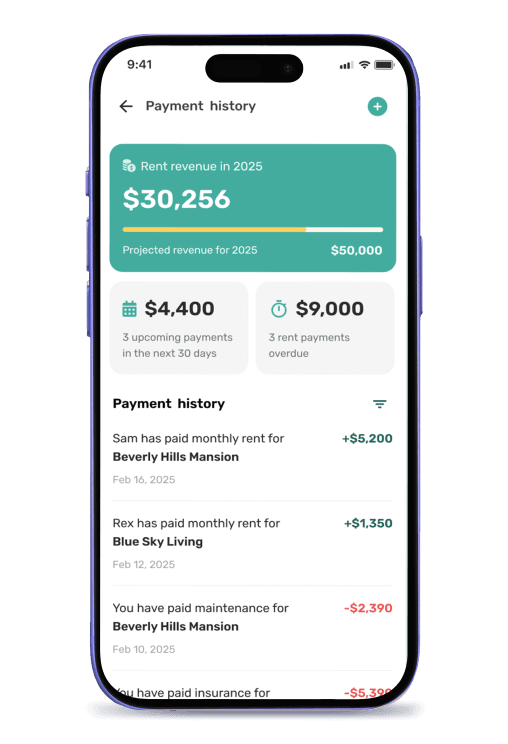
When the rent clears, the reminders for that cycle end, and the payment posts to the payment history on both the tenant record and the rental unit.
Late Fees and Notices Continue Without You
If the rent is still missing after the grace days you set, automatic late fees apply per the lease agreement, and the notice states the updated balance.
Why Choose Equipped for Rent Payment Reminders
A standalone reminder tool can send a notification, but it cannot see whether the rent arrived, so it either reminds tenants who have already paid or waits for you to mark the payment yourself. Equipped sends the reminder and collects the rent payment in the same app, so one payment process runs end to end: reminders are conditional, records complete, late fees automatic. Every part of that process exists to ensure timely rent payments.
The reminder references the lease agreement, the payment posts against the right property, the fee applies from the same rule, and the notice trail sits beside the rent payments in one tenant record. Landlords and property managers get timely rent payments, fewer uncomfortable conversations, and a documented history. Most property management software stops at the notification; Equipped is one place to collect rent, remind tenants about it, and prove you did — which is what it means to streamline rent collection rather than automate one step of it.
About Equipped
Rent reminders are one part of automated rent collection, and they pair with late payment and eviction prevention. Equipped is a rental property management software company headquartered in Alpharetta, Georgia. The Equipped app is a mobile rental property assistant for iOS and Android that centralizes tenant screening, onboarding, rent collection, maintenance, and property records in one place. Landlords and property managers across the United States use Equipped to ensure timely payments and keep the rent invoice records that back them up. Download the Equipped app to get started.
Frequently Asked Questions
Let the reminders do the chasing
Download the Equipped app on the Apple App Store or Google Play.